WorkBuddy Review 2026: I Tested Tencent's AI Office Agent for Two Weeks
I went in skeptical. Another “AI office assistant” announcement, another chatbot with a fresh coat of paint. But after two weeks of actually running my real work through WorkBuddy — Tencent’s agentic office tool — I’ll say the thing up front: it’s not another chat window. It’s one of the few tools that closes the loop from “ask” to “done,” and for a certain kind of office worker it quietly replaces an hour of busywork a day.
The catch, and there is one, is in the word agentic. Most AI tools answer you. WorkBuddy tries to do the thing — open the file, edit the sheet, draft the email, and hand you a result you can use. It doesn’t always get there unattended, but the gap is smaller than I expected from a domestic product.
The three modes are not marketing fluff
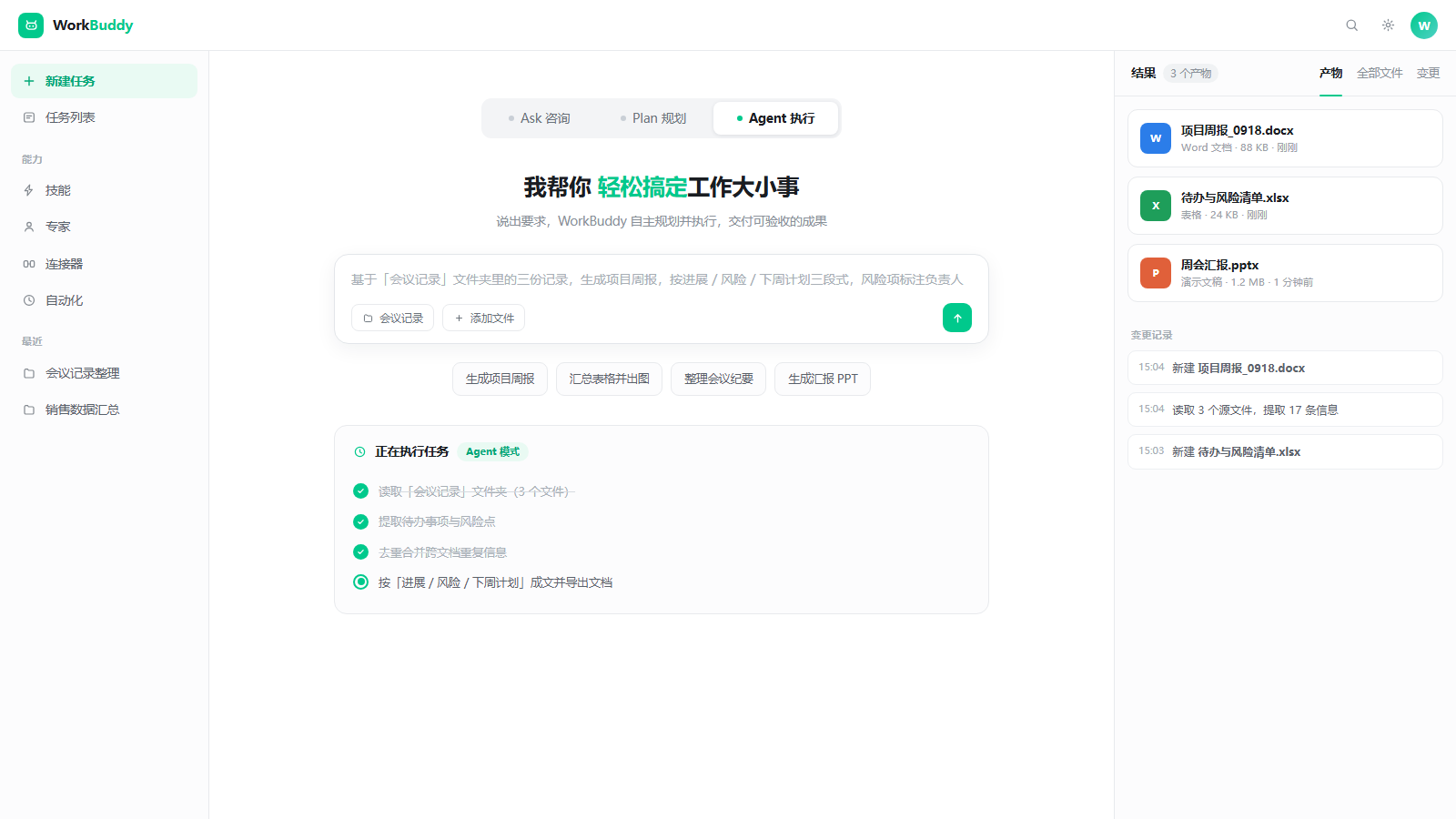
WorkBuddy ships three modes — Ask, Plan, Agent — and the difference matters more than the splash screen suggests.
- Ask is the familiar chat. Good for “what’s the difference between X and Y” or “draft a paragraph.” I used it maybe 20% of the time.
- Plan is the one people skip and shouldn’t. You describe an outcome — “turn these meeting notes into a client-ready status report” — and it lays out the steps before touching anything. You approve, it executes. This single gate probably saved me from three bad auto-edits.
- Agent is where it earns the name. You hand it a goal and the keys to your files, and it works through them: read, write, run, check. I let it loose on a 2,000-row spreadsheet and came back to a cleaned, deduplicated, formula-fixed version with a change log.
The mental model: Ask for thinking, Plan for risky edits, Agent for grunt work you’d otherwise delegate to an intern.
Five things I actually ran
- Messy notes → structured report. I dumped a folder of scattered markdown notes from a project into WorkBuddy and asked for a client-ready status report. Plan mode outlined it; Agent filled it. The first pass was 80% there. I corrected two numbers; it learned the format.
- Spreadsheet resuscitation. A 2,000-row export with inconsistent date formats, duplicate rows, and three broken formulas. Agent mode fixed all three in one run and left a short change log I could audit. This alone paid for the two weeks.
- Cross-app data pull. The task that used to eat my Friday: pull figures from a doc, a sheet, and a CRM export, then draft a weekly email. WorkBuddy chained the reads and produced a draft I only had to sign. This is the “agentic” promise actually landing.
- A reusable skill. The weekly summary was repetitive, so I saved it as a reusable “skill” — basically a saved workflow. Now it’s one click every Monday. This is the feature I’d pay for even if everything else were mediocre.
- A scheduled task. I set a daily digest to run each morning. It’s imperfect (it sometimes needs a nudge), but the bones are there.
Where it beats a chat AI
The honest answer: execution. A chatbot tells you how to clean a spreadsheet. WorkBuddy cleans it. That difference compounds across a workday. The reusable-skills layer is the sleeper — once you’ve taught it your recurring jobs, it stops being a tool and starts being a junior ops person. And because it’s built to touch your actual files and apps (via MCP), it lives in your workflow instead of a sidebar you copy-paste out of.
Where it still needs you
I’m not going to oversell it. Three gaps:
- Long autonomous runs drift. Give it a vague two-hour goal and it will wander. Tight, well-scoped tasks are where it shines; open-ended ones need checkpoints (use Plan mode).
- Niche domains. It’s strong on office/standard knowledge, weaker on anything deeply specialized. Surprising? Not really — that’s every model.
- You are still the reviewer. It produces a draft, not a verdict. The change log helps, but you own the final yes.
The bigger picture: a Chinese agent that holds its own
I’ll be blunt about why this review lives on a site that covers Chinese tech: a few years ago, “Chinese AI office tool” meant a clone with rougher edges. WorkBuddy isn’t that. It’s a credible, genuinely usable agent from Tencent that goes toe-to-toe with the overseas names on the workflows that matter to most office workers — and it’s priced to be tried, not negotiated. If you care about backing capable domestic software, this is the kind of product worth taking seriously, not just for patriotism but because it actually works.
Who it’s for
- You live in documents, spreadsheets, and cross-app data pulls.
- You have 2–3 recurring reports you dread.
- You want execution, not just answers.
Not for you if your work is mostly open-ended research or creative writing where a plain chatbot already does the job.
My take
WorkBuddy won’t replace your judgment, and it shouldn’t. But for the dry, repetitive, “why is this still manual” half of an office job, it’s the closest thing I’ve used to handing the work to someone competent. Start with Plan mode on one ugly task this week; that’s all it takes to see the point.
Try it
Disclosure: if you order through our link, TechMinds may earn a small commission at no extra cost to you.